NUS Event Mailer Pro Developer Guide
Acknowledgements
This project is based on the AddressBook-Level3 project created by the SE-EDU initiative.
AI was used throughout the development of this project:
- GitHub Copilot was used for auto-completing code snippets and PR reviews.
- Claude Sonnet 4.5 was used to generate the unit tests.
- Claude Haiku 4.5 was used to review long documents and tool-use to ensure document consistency.
1. Getting Started
1.1 Project Overview
NUS Event Mailer Pro (NUS EMP) is a desktop application designed for NUS event organizers to manage contacts and events efficiently. The application features a graphical user interface (GUI) with an integrated command terminal for keyboard-driven input, built using Java 17 and JavaFX.
Core Capabilities:
- Contact management with tagging and event assignment
- Event creation and status tracking
- Contact-event association management
- Bulk email campaign preparation
- Data import/export capabilities
1.2 Quick Setup
Refer to the guide Setting up and getting started for detailed installation and setup instructions.
1.3 Development Workflow
- Clone the repository and import into your preferred IDE
- Run the application using the Main class or Gradle task
- Understand the architecture by reviewing Section 2
- Follow the coding standards outlined in Section 6
- Write tests for new features following Section 6 guidelines
- Update documentation as part of your pull request
2. System Architecture
2.1 High-Level Architecture
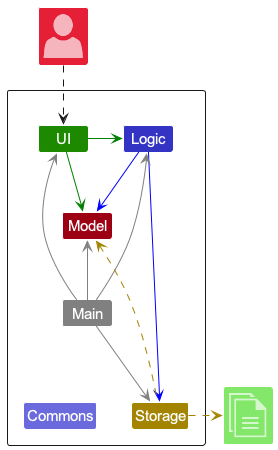
The application follows a clean architecture pattern with five main components:
- UI: JavaFX-based graphical interface with command terminal
- Logic: Command parsing and execution engine
- Model: Data entities and state management
- Storage: JSON-based persistence layer
- Commons: Shared utilities and core components
2.2 Component Overview
2.2.1 Main Component
The Main class handles application lifecycle:
- Initializes components in correct sequence during startup
- Manages graceful shutdown with cleanup operations
- Coordinates component dependencies and wiring
2.2.2 UI Component
API: Ui.java
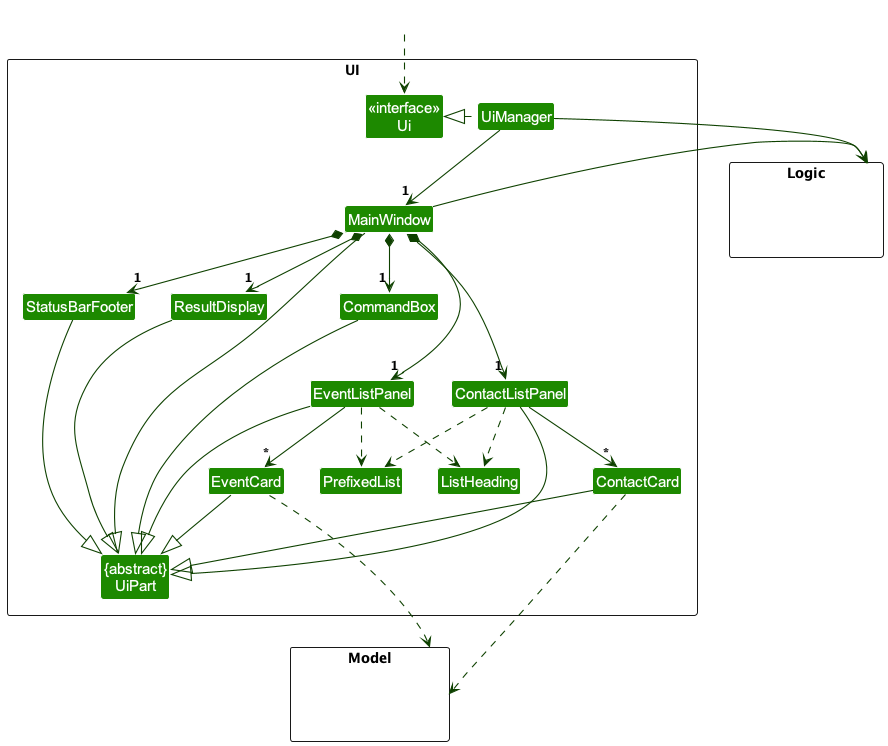
The UI component consists of:
MainWindow: Primary application windowCommandBox: User input interfaceResultDisplay: Command feedback display- Both of
CommandBoxandResultDisplayare automatically hidden, unless the user presses the terminal button located on the sidebar or presses the keyboard shortcut (Ctrl + T) which will bring them up ContactListPanel/EventListPanel: Data presentation panels that fetch their data from themodelcomponentStatusBarFooter: Status information display
All UI components inherit from UiPart abstract class and use FXML for layout definitions.
2.2.3 Logic Component
API: Logic.java
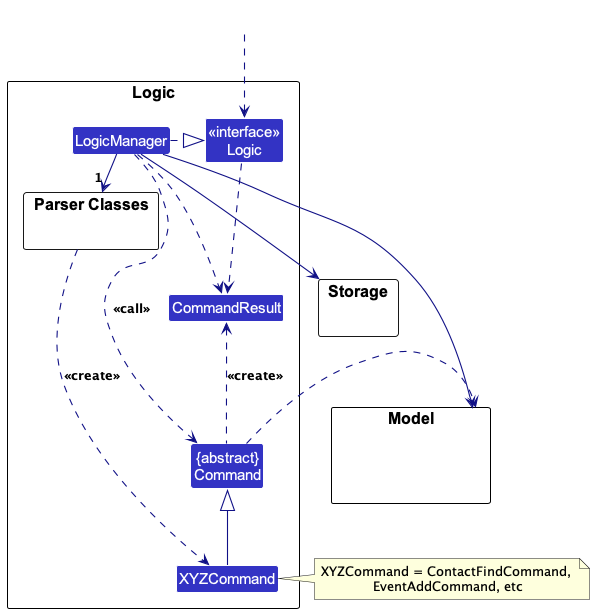
The Logic component manages:
- Command parsing: Translates user input into executable commands
- Command execution: Executes commands against the model
- Result formatting: Returns formatted results to the UI
Key classes:
LogicManager: Main logic coordinatorAppParser: Routes commands to appropriate parsersCommandhierarchy: Individual command implementations
2.2.4 Model Component
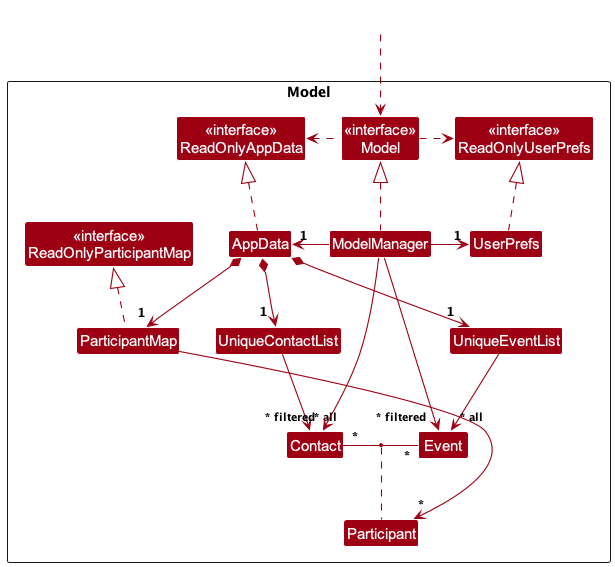
API: Model.java
The Model component maintains application state:
- Data storage:
UniqueContactList,UniqueEventList - Filtered views: Observable lists for UI binding
- User preferences: Application settings and preferences
- Data relationships: Contact-event associations with
ParticipantMap
For more details, refer to Section 3.
2.2.5 Storage Component
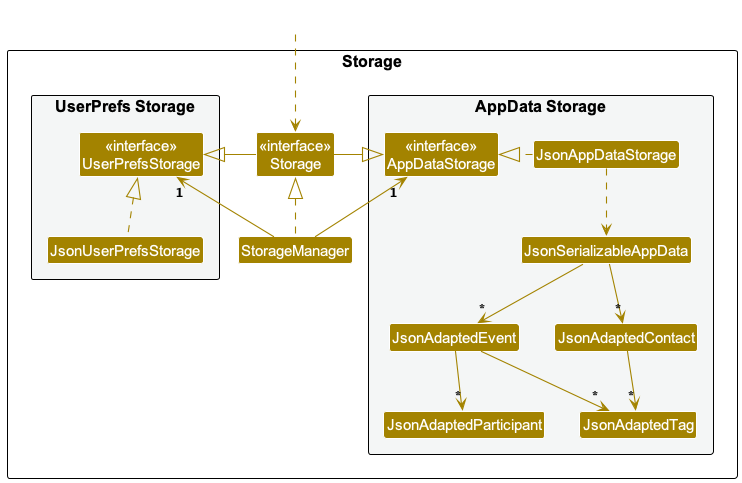
API: Storage.java
The Storage component handles persistence:
- JSON serialization: Convert objects to/from JSON
- File operations: Read/write data files
- Backup management: Automatic backup creation
- Corruption handling: Data recovery mechanisms
2.2.6 Commons Component
The Commons component provides shared utilities:
- Core classes: AppParameters, CommandType enum, Messages constants
- Utilities: String formatting, collection utilities, validation helpers
- Exceptions: Base exception classes for error handling
- Logging: Centralized logging configuration and utilities
2.3 Component Interactions
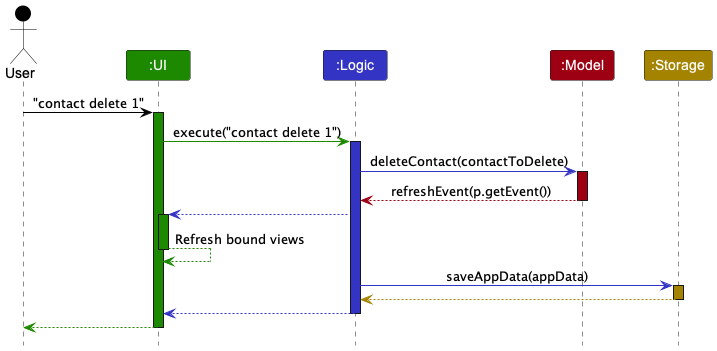
The components interact through well-defined interfaces:
- UI calls Logic to execute commands
- Logic updates Model state
- Model notifies UI of changes through observable lists
- Storage persists Model data on changes
3. Core Domain Model
3.1 Data Model Overview
The Model component,
- stores all data in NUS EMP
- stores the currently "selected"
Contacts andEvents as a filtered list, exposed to outsiders as an unmodifiableObservableList, which can be observed for UI updates - stores a
UserPrefobject that represents the user’s preferences, e.g. dark theme, window sizes - does not depend on the other main components, as its single responsibility is to manage the data of NUS EMP
The Model component manages three core entity types:
- Contact: Individuals with contact information and tags
- Event: Events with names, statuses, dates, venues and tags
- Participant: A relationship that contains the RSVP status of a contact for a specific event. It is a simple data class with three fields:
Contact,EventandParticipantStatus.
3.2 Contact and Event
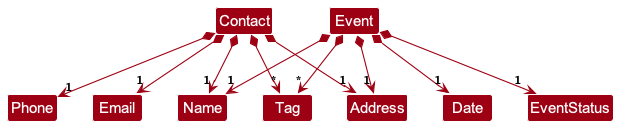
Both Contact and Event classes share several design characteristics:
- Immutable data structure that contains various fields, which are in turn represented by their own classes:
Name,Email,Phone,Address,Tag,Date,EventStatus - Primary key system for uniqueness: email address (case-insensitive) for
Contact, name forEvent - An internal field
invalidationToggleto provide invalidation mechanism for observable list updates
For the field classes:
- Each class encapsulates validation logic and formatting rules specific to its own field type.
- Each field class must be provided during the construction of
ContactorEventobjects, even optional fields. - Optional fields (i.e.
PhoneandAddress) are represented using empty values instead.
3.3 Participant Handling
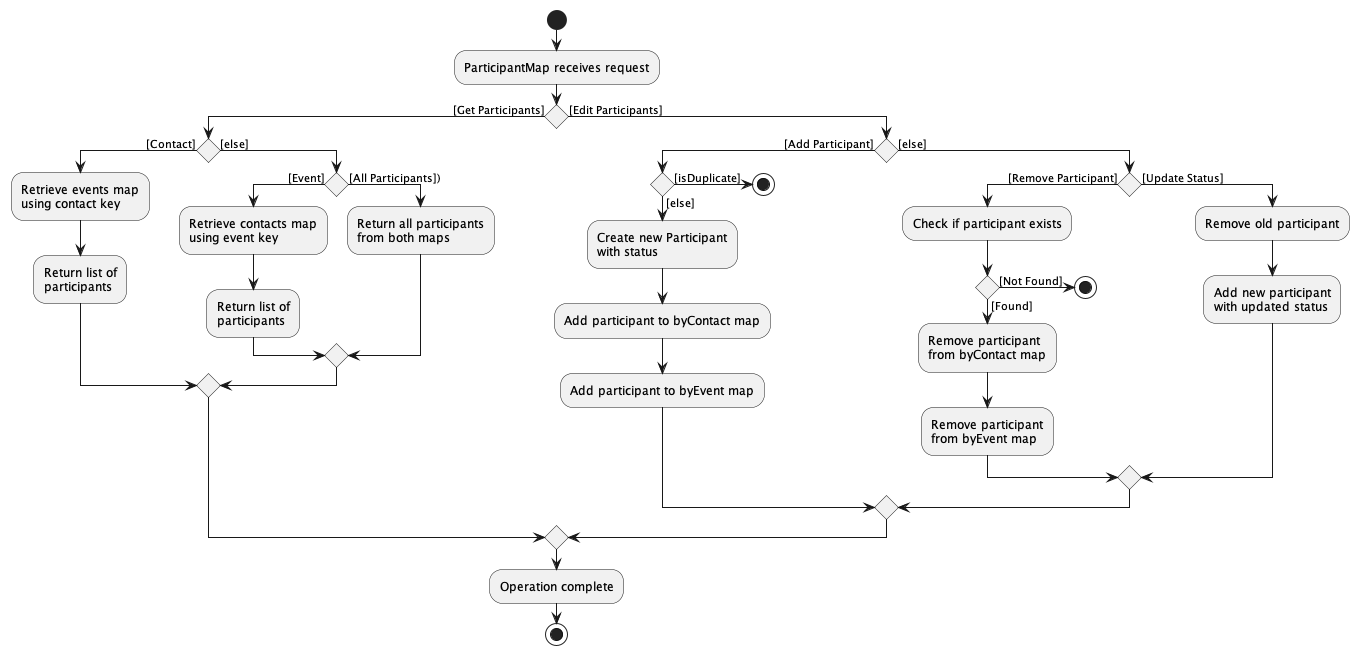
Participant links between contacts and events are handled through a ParticipantMap:
- It internally uses two HashMaps to maintain bidirectional relationships.
- Keys used are
ContactKeyandEventKey, which are simple classes that only store the primary key fields (i.e. case-insensitive email forContactKeyand name forEventKey). - Lookups for contacts and their linked events are done through these keys for efficiency.
4. Command System
4.1 Command Processing Flow
The command system follows a consistent pattern:
- Input Parsing:
AppParserroutes commands to specific parsers - Command Creation: Parsers create appropriate
Commandobjects - Validation: Model validates entities on construction, Commands validate business rules, Storage validates data integrity
- Execution: Commands execute against the model
- Result Formatting: Success/error messages returned to UI
4.2 Command Categories
4.2.1 Contact Commands
contact add: Add new contact with name, email, phone, address, and tagscontact delete: Remove contact by indexcontact edit: Modify contact details (name, email, phone, address, tags)contact find: Search contacts by keywords or specific fieldscontact list: Display all contacts with indicescontact show: View contact details and associated events
4.2.2 Event Commands
event add: Create new event with name, date, address, and tagsevent delete: Remove event by indexevent edit: Modify event details (name, date, address, status, tags)event list: Display all events with indices and statusevent show: View event details and associated contactsevent link: Associate contacts with eventsevent unlink: Remove contact associations from eventsevent export: Export all contacts from an event to clipboardevent rsvp: Update contact's RSVP status for an event
4.2.3 System Commands
help: Display command help (opens user guide in browser)exit: Terminate application
4.3 Parser Architecture
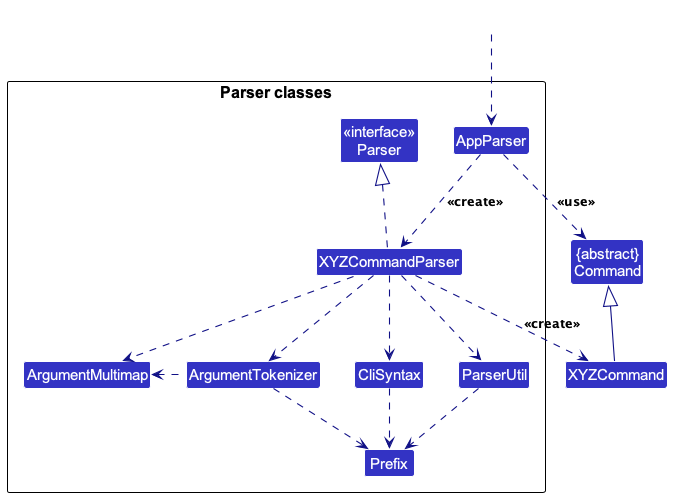
The parser system uses a direct interface implementation approach:
Parser<T>: Generic interface for all command parsersAppParser: Main command router using regex patterns and CommandType enum- Individual parsers: Each implements
Parser<SpecificCommand>directly CommandTypeenum: Routes commands to appropriate parsing logic (CONTACT, EVENT, HELP, EXIT, UNKNOWN)
Key Components:
BASIC_COMMAND_FORMAT: Initial command type separationCONTACT_COMMAND_FORMAT: Contact command parsing patternEVENT_COMMAND_FORMAT: Event command parsing patternArgumentTokenizer: Handles prefix-based argument parsing (--name, -n, etc.)
4.4 Error Handling Flow
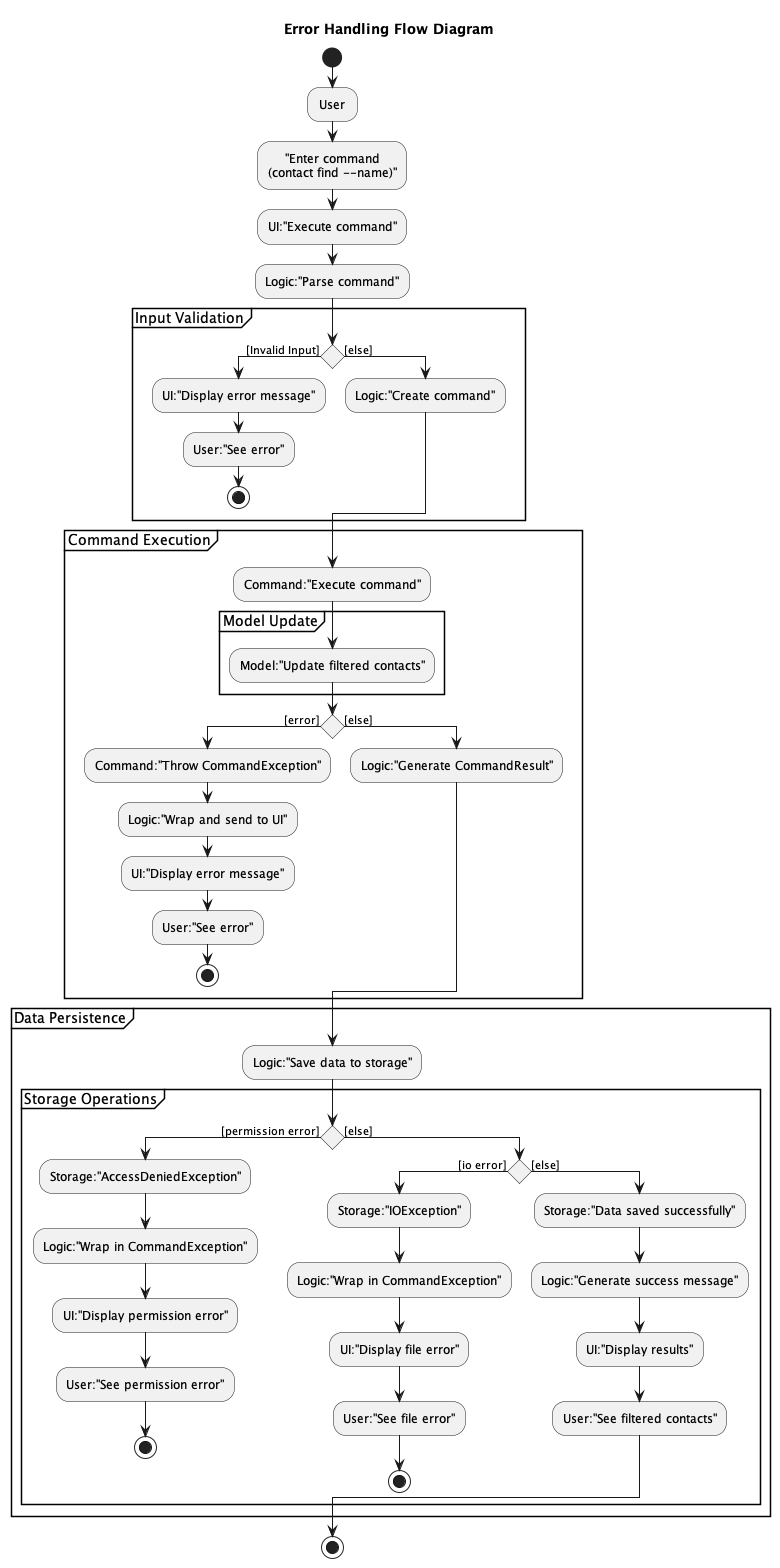
Error handling follows these principles:
- Input validation: Validate before processing using
ParseException - Command execution errors: Handle runtime errors using
CommandException - Clear messages: Use
Messagesclass constants for consistent error feedback - Logging: Log parsing failures using
LogsCenterfor debugging - Exception propagation: Handle at appropriate levels (parsing vs execution)
Exception Types:
ParseException: Input format and validation errorsCommandException: Command execution errorsIllegalValueException: Base class for parsing-related errors
5. Component Interactions
5.1 Add Contact Flow
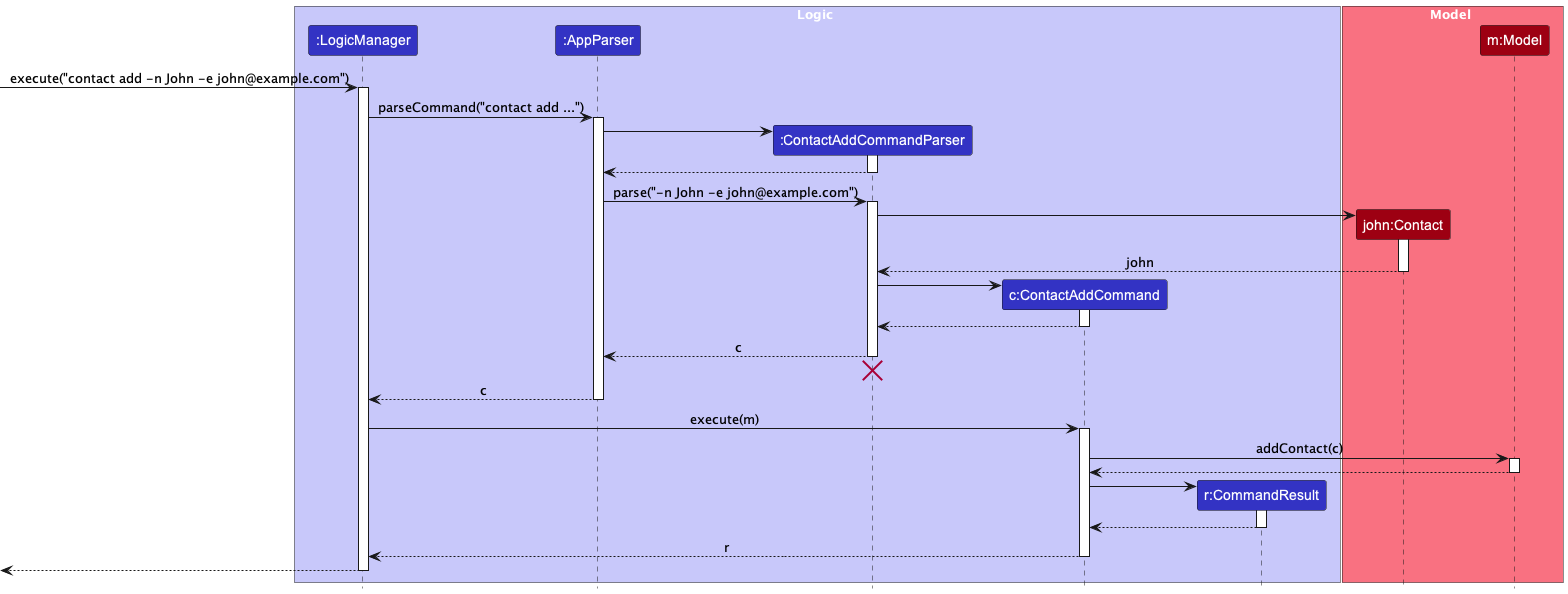
Steps:
- User inputs
contact addcommand - UI passes input to Logic component
- AppParser routes to ContactAddCommandParser
- Parser validates input and creates ContactAddCommand
- Command executes against Model
- Model validates and adds contact to UniqueContactList
- Storage persists updated data
- UI updates through observable list binding
- Success message displayed to user
5.2 Create Event Flow
Refer to Add Contact Sequence Diagram above.
Steps:
- User inputs
event addcommand with event details - UI passes input to Logic component
- AppParser routes to EventAddCommandParser
- Parser validates dates, times, and other parameters
- EventAddCommand created and executed
- Model constructor validates event and adds to UniqueEventList
- Storage persists updated event data
- UI refreshes event list display
- Confirmation message shown to user
5.3 Link Contact to Event Flow
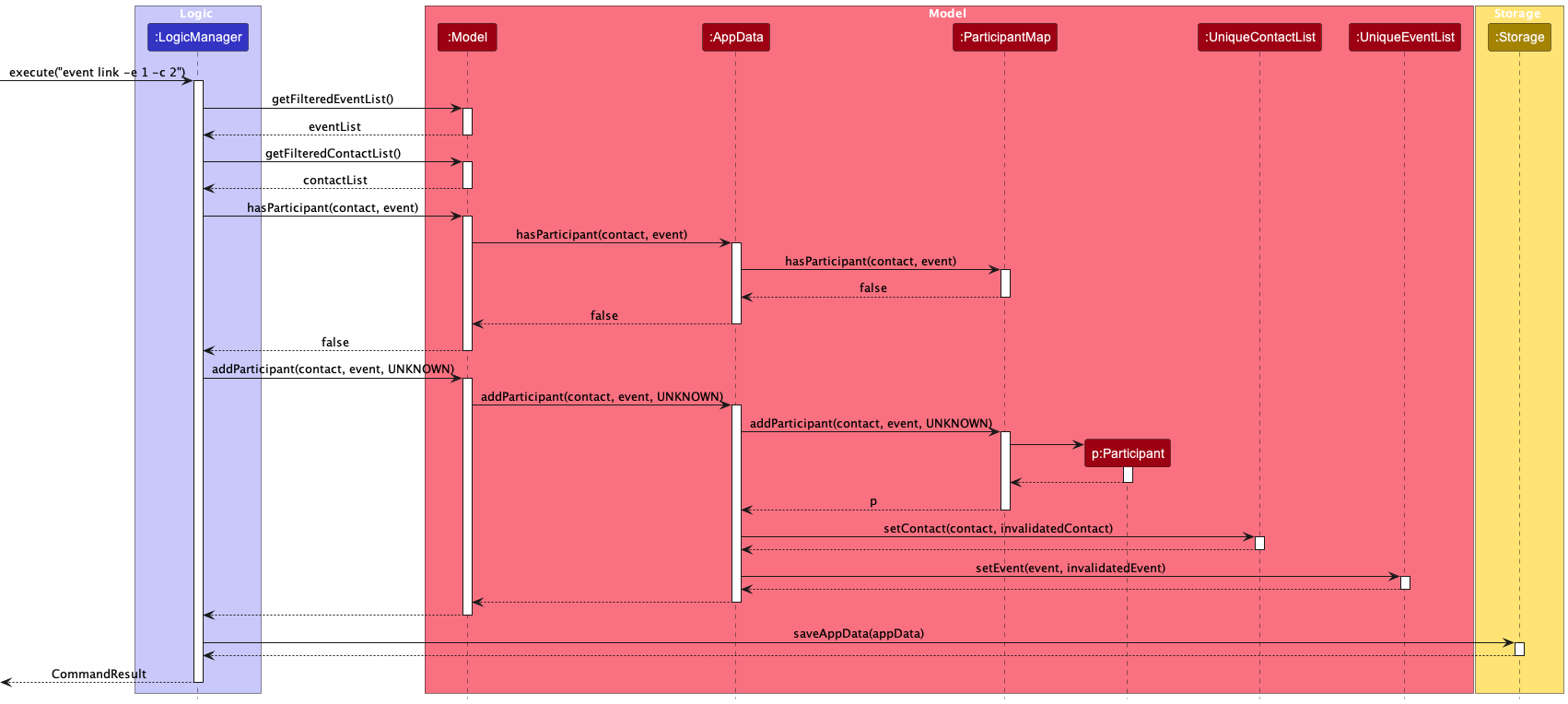
Steps:
- User inputs
event linkcommand with contact and event identifiers - Logic parses command and validates contact/event existence
- Participant object created with appropriate status
- Model updates ParticipantMap and triggers invalidationToggle mechanism for both contact and event displays
- Storage persists relationship changes
- UI updates both contact and event displays
- Success confirmation displayed
5.4 Search/Find Flow
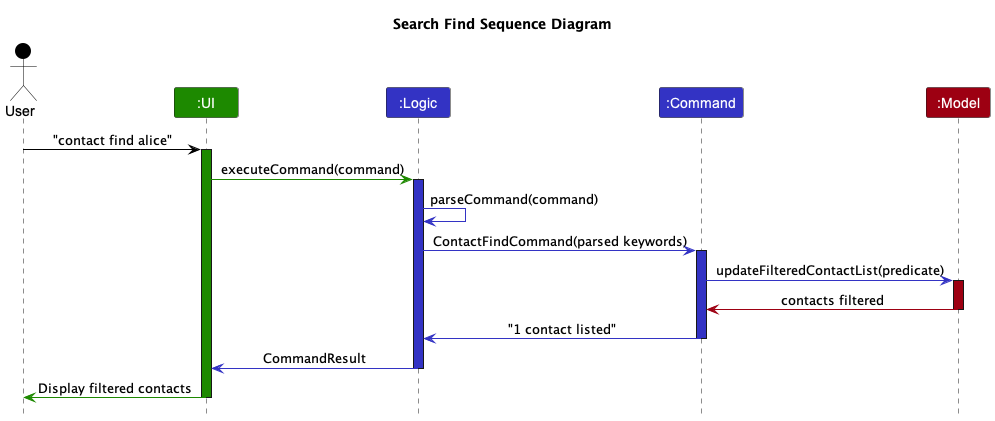
Steps:
- User inputs
contact findorevent findcommand with search criteria - UI passes input to Logic component
- AppParser routes to appropriate FindCommandParser (ContactFindCommandParser)
- Parser validates search keywords and field prefixes
- Predicate objects created based on search criteria (name, email, phone, address, tag)
- FindCommand created and executed with predicate
- Model updates filtered contact/event list using predicate
- Observable lists trigger UI updates to show filtered results
- Success message with result count displayed to user
5.5 Error Handling Sequence
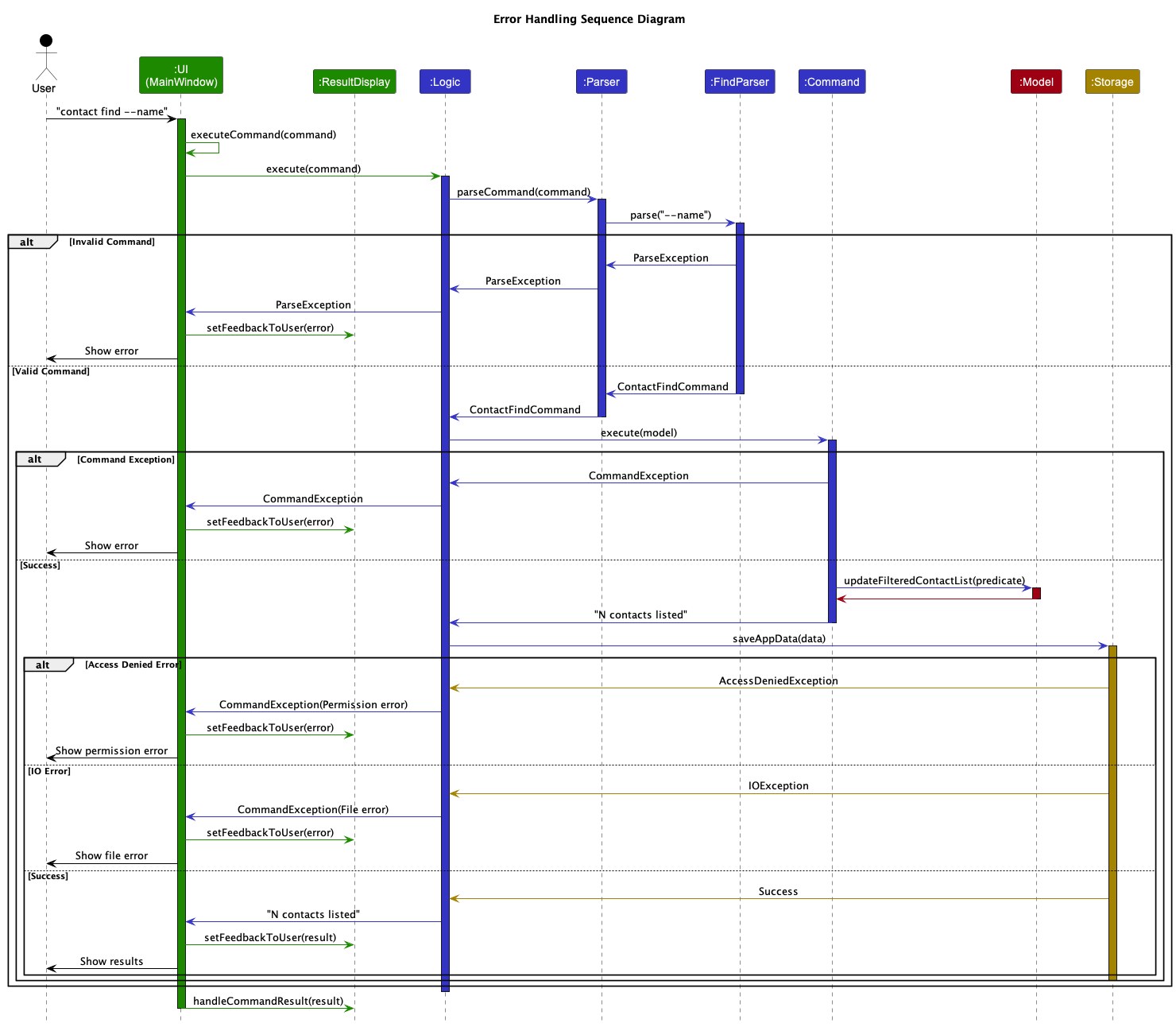
Steps:
- Exception occurs in any component (parsing, validation, execution, storage)
- Exception caught and wrapped in appropriate exception type
- Error message formatted with actionable guidance
- CommandResult created with error information
- UI displays error message in ResultDisplay
- Model state remains unchanged (transactional behavior)
- User can retry command with corrected input
5.6 Application Startup/Initialization Flow
Steps:
- Main class starts JavaFX application and calls MainApp
- MainApp initializes Config with default fallbacks
- Storage components created (JsonAppDataStorage, JsonUserPrefsStorage)
- ModelManager created with empty AppData and UserPrefs
- LogicManager initialized with Model and Storage dependencies
- UiManager initialized with Logic and Model references
- Existing data loaded from storage into Model through Storage
- Data corruption handling creates sample data if loading fails
- Main window displayed with loaded or sample data
- Application ready for user input
5.7 Edit/Update Flow
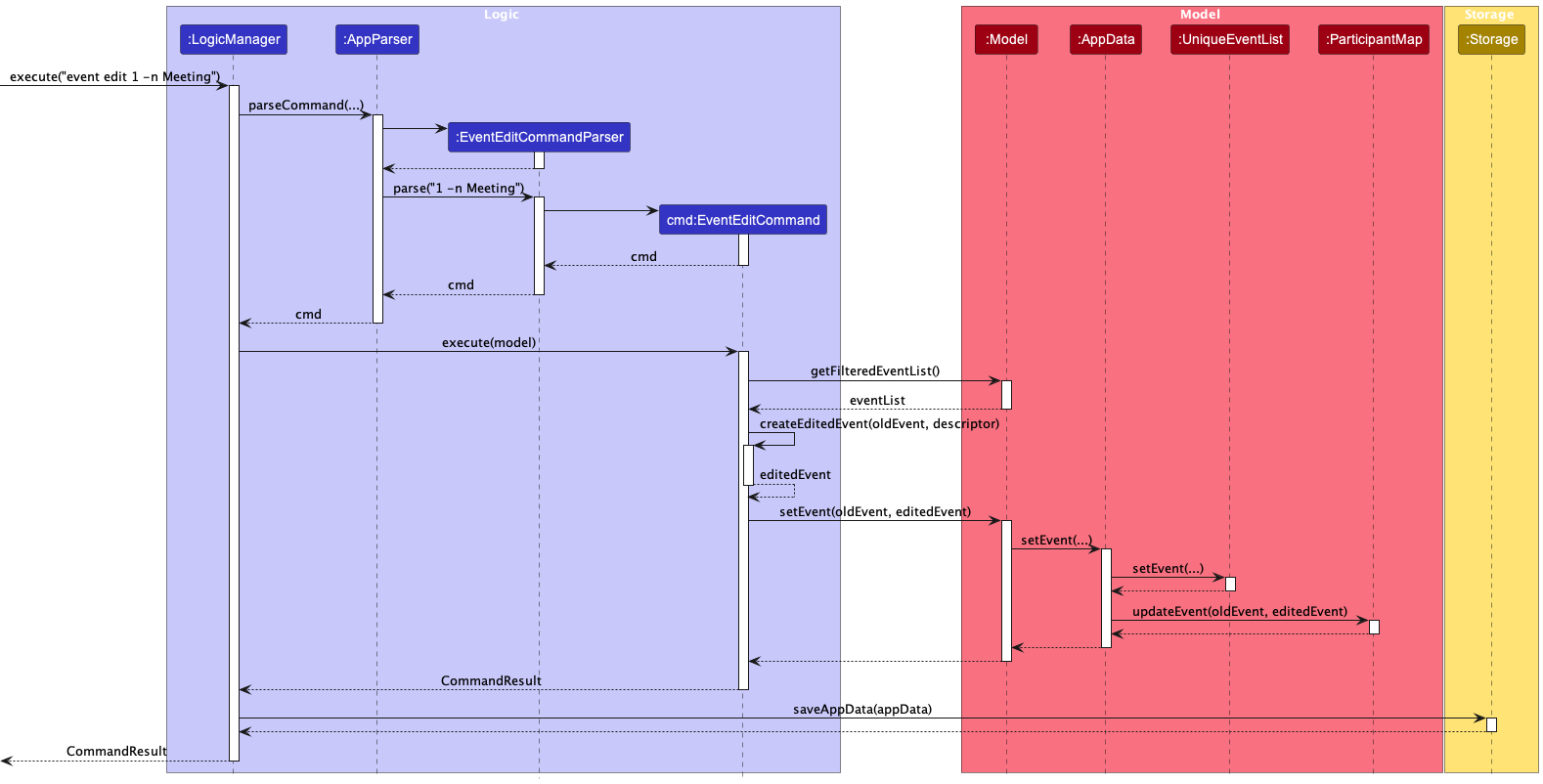
Steps:
- User inputs
contact editorevent editcommand with index and new values - UI passes input to Logic component
- AppParser routes to appropriate EditCommandParser
- Parser validates index exists and new field values
- EditCommand created with index and updated field data
- Command executes against Model to locate original entity
- New entity object created with updated fields (immutable pattern)
- Model replaces original entity in UniqueContactList/UniqueEventList
- Storage persists updated entity data
- Observable lists trigger UI updates to reflect changes
- Success message displayed with updated entity details
5.8 RSVP Status Update Flow
Refer to Edit/Update Sequence Diagram above.
Steps:
- User inputs
event rsvp --event EVENT_INDEX --contact CONTACT_INDEX --status STATUScommand - UI passes input to Logic component
- AppParser routes to EventRsvpCommandParser using CommandType enum
- Parser validates event and contact indices exist and status is valid (UNAVAILABLE, AVAILABLE, UNKNOWN)
- EventRsvpCommand created with validated parameters
- Command executes against Model to locate event and contact in their respective lists
- Model uses ParticipantMap to find existing Participant
- Participant status updated to new RSVP status
- ModelManager automatically triggers Storage save operation
- Storage persists updated participant relationship data to JSON files
- Observable lists update both event and contact displays
- Success message displayed with RSVP confirmation
5.9 Data Persistence Flow
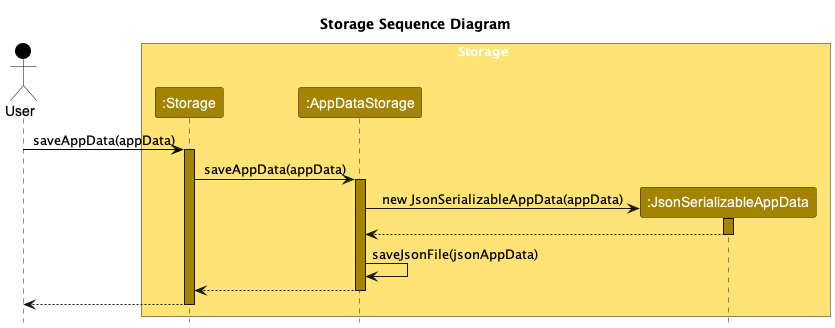
Steps:
- Command execution completes successfully in Model
- ModelManager automatically calls storage save method
- JsonSerializableAppData serializes Model data to JSON format with participant relationships stored as email references
- JSON data written to primary storage files
- Backup files created before overwriting existing data
- Storage validates file integrity after writing
- Success/failure status logged and reported back to Model
- Storage corruption handling provides recovery options if needed
6. Advanced Topics
6.1 Observable Pattern Implementation
The application uses JavaFX's observable pattern for real-time UI updates:
// In ModelManager
private final ObservableList<Contact> filteredContacts = FXCollections.observableArrayList();

// UI components bind to this list
contactListPanel.setItems(model.getFilteredContactList());
Key Features:
- Automatic UI updates: When Model data changes, UI updates automatically
- Invalidation mechanism: Contacts and Events use invalidationToggle field with immutable pattern to force observable list refreshes through object replacement
- Filtered views: Separate observable lists for filtered and all data
- Decoupled architecture: UI doesn't need to know when data changes
- Efficient updates: Only UI components that display changed data are updated
6.2 Performance Considerations
6.2.1 Data Scaling
- Application supports up to 10,000 contacts and 1,000 events
- Observable lists use efficient change detection
- JSON serialization optimized for large datasets
- UI virtualization for large lists (if implemented)
6.2.2 Memory Management
- Immutable objects prevent memory leaks
- Weak references in event listeners
- Proper cleanup in component disposal
6.3 Common Debugging Scenarios
6.3.1 Command Not Found
- Check command registration in AppParser
- Verify parser class exists and is accessible
- Validate command word spelling
6.3.2 Data Not Persisting
- Check file permissions
- Verify JSON serialization works
- Check storage file paths
- Look for corruption handling in logs
6.3.3 UI Not Updating
- Verify observable list binding
- Check for invalidation toggle usage
- Ensure proper list change notifications
6.4 Extension Points
6.4.1 Custom Commands
- Extend
Commandbase class - Follow existing naming conventions
- Implement proper error handling
6.4.2 New Entity Types
- Create entity classes following Contact/Event patterns
- Add to Model component interfaces
- Implement storage serialization
- Create appropriate UI components
6.4.3 Storage Backends
- Implement
Storageinterface - Handle serialization format
- Maintain existing API contracts
7. Development Guidelines
7.1 Adding New Commands
Step-by-step process:
Create Command Class
public class NewCommand extends Command {
    @Override
    public CommandResult execute(Model model) throws CommandException {
        // Implementation
    }
}
Create Parser Class
public class NewCommandParser implements Parser<NewCommand> {
    public NewCommand parse(String args) throws ParseException {
        // Parsing logic
    }
}
Update AppParser
- Add command to CommandType enum if needed
- Add routing logic in parseCommand method
- Add regex pattern matching for new command
Add Tests
- Unit tests for command execution
- Parser tests for input validation
- Integration tests for end-to-end flow
Update Documentation
- Add command to User Guide
- Update Developer Guide if needed
7.2 Adding New Data Fields
For Contact fields:
- Add field to
Contactclass - Update constructor and validation logic
- Modify storage JSON adapters
- Update UI components and FXML
- Add parser support for new field
- Update test cases
For Event fields:
- Add field to
Eventclass - Follow similar steps as Contact fields
- Consider impact on participant relationships
7.3 Testing Best Practices
7.3.1 Unit Tests
- Test each public method individually
- Mock external dependencies
- Cover both success and failure scenarios
- Use descriptive test method names
7.3.2 Integration Tests
- Test component interactions
- Use actual file system for storage tests
- Validate end-to-end command flows
- Test UI updates through observable lists
7.3.3 Test Structure
@Test
void execute_contactAddCommand_success() {
    // Arrange
    Model expectedModel = new ModelManager();
    Contact validContact = new Contact(...);
    expectedModel.addContact(validContact);

    // Act
    CommandResult result = new ContactAddCommand(validContact).execute(model);

    // Assert
    assertEquals(expectedModel, model);
    assertEquals(String.format(MESSAGE_ADD_CONTACT_SUCCESS, validContact),
                 result.getFeedbackToUser());
}
7.4 Code Style Guidelines
- Follow Java coding standards
- Use meaningful variable and method names
- Keep methods short and focused
- Write self-documenting code
- Use assertions for internal assumptions
- Handle exceptions gracefully
8. Supporting Documentation
Appendix A: Requirements
A.1 Product Scope
A.1.1 Target User Profile
Event organizers at NUS who manage large contact databases, send bulk emails regularly, prefer keyboard-driven CLI interfaces for efficiency, and need automated mailing recommendations for targeted communication with event participants and stakeholders.
A.1.2 Value Proposition
Streamlines event communication workflow by integrating contact management with intelligent mailing recommendations and bulk email capabilities in a fast, keyboard-centric CLI interface, enabling event organizers to efficiently manage contacts and execute targeted email campaigns without switching between multiple tools.
A.2 User Stories
Priorities: High (must have) - * * *, Medium (nice to have) - * *, Low (unlikely to have) - *
| Priority | As a … | I want to … | So that I can… |
|---|---|---|---|
* * * | event organizer | add a contact with standard fields (Name, Phone, Email, Address) | build my core contact database |
* * * | event organizer | associate a specific tag (e.g., 'Speaker', 'Attendee', 'VIP', 'Sponsor') | categorize and filter my contacts effectively |
* * * | event organizer | delete a contact from the address book | remove outdated or irrelevant entries |
* * * | event organizer | create a new event with name, date, time, and venue | start organizing my contacts around it |
* * * | event organizer | view a list of all my events, showing key details and their status | get an overview of upcoming, past, or cancelled events |
* * * | event organizer | associate contacts from my address book with a specific event | build an attendee list for the event |
* * * | event organizer | get a list of contacts defined by tags, or event association | target communications and manage groups efficiently |
* * | event organizer | set RSVP status for a contact for a specific event | track attendance commitments |
* * | event organizer | edit any field of an existing contact, including tag and RSVP status | keep contact information up-to-date |
* * | event organizer | view all details of a contact, including tags, and associated events | see a clean, readable summary |
* * | event organizer | view all details of an event, including tags, and associated contacts | see a clean, readable summary |
* * | event organizer | find contacts by searching any field (Name, Tag, Email) | quickly locate specific individuals |
* * | event organizer | add multiple tags to a contact | perform complex filtering |
* * | event organizer | filter contact list by tags | create highly specific lists |
* * | event organizer | list all contacts, with option to sort by Name or tags | get a general overview |
* * | event organizer | remove a contact from an event without deleting from address book | manage event participation flexibly |
* * | event organizer | archive a past event | keep main view uncluttered but retain data |
* * | event organizer | set event status to 'Cancelled' | exclude it from mailings |
* * | event organizer | import contacts from a CSV file | quickly populate my address book |
* * | event organizer | export contacts or filtered subset to CSV | backup or use in another application |
* * | user | create a complete backup of application data | safeguard my information |
* * | user | restore application data from a backup file | recover from data loss |
* * | user | specify storage location for data and backups | organize my files as needed |
* | user | sort contacts by name | locate a person easily |
* | user | manage additional entity types related to contacts (tasks, loans, grades) | extend functionality as needed |
A.3 Use Cases
For all use cases below, the System is NUS Event Mailer Pro (NUS EMP) and the Actor is the user, unless specified otherwise.
| Use Case | Preconditions | Main Success Scenario | Extensions | Postconditions |
|---|---|---|---|---|
| UC01: Add a contact | System is running | 1. User inputs contact details with name and email 2. System validates required fields 3. Contact added to the system 4. Success message displayed Use case ends. | 1a. Required fields missing or invalid - System shows error message with missing fields - User can retry with correct input - Use case ends. 2a. Contact already exists - System shows error about duplicate contact - User can add with different email - Use case ends. | Contact added to system |
| UC02: Delete a contact | Contact exists in displayed list | 1. User selects contact by index 2. User confirms deletion 3. Contact removed from system and all associated events 4. Confirmation message displayed Use case ends. | 1a. Invalid contact index - System shows error about invalid index - User can try with correct index - Use case ends. | Contact removed from system and all events |
| UC03: Edit a contact | Contact exists in displayed list | 1. User selects contact by index 2. User edits the contact 3. System updates the contact fields. 4. Confirmation message displayed Use case ends. | 1a. Invalid contact index - System shows error about invalid index - User can try with correct index - Use case ends. 1b. Invalid command format for editing fields - System shows error about invalid command format, and a usage message - User can try with correct correct format - Use case ends. | Contact is updated with new fields |
| UC04: Create an event | System is running | 1. User inputs event details with name and date 2. System validates date format 3. Event created with PENDING status 4. Success message displayed Use case ends. | 1a. Required fields missing - System shows error about missing name or date - User can provide missing information - Use case ends. 2a. Invalid date format - System shows specific date format error (DD-MM-YYYY HH:mm) - User can correct date format - Use case ends. | Event added to system |
| UC05: Delete an event | System is running | Similar to UC02, but contact is replaced with event, and vice versa | Similar to UC02, but contact is replaced with event, and vice versa | Event removed from system and all contacts |
| UC06: Edit an event | System is running | Similar to UC03, but contact is replaced with event, and vice versa | Similar to UC03, but contact is replaced with event, and vice versa | Event is updated with new fields |
| UC07: List contacts | System is running | 1. User requests to list contacts 2. System displays all contacts 3. Each contact shown with index and details Use case ends. | 1a. No contacts exist - System shows "No contacts found" - User can add contacts using add command - Use case ends. | Contact list displayed |
| UC08: List events | System is running | 1. User requests to list events 2. System displays all events 3. Each event shown with index, date, and status Use case ends. | 1a. No events exist - System shows "No events found" - User can create events using add command - Use case ends. | Event list displayed |
| UC09: Filter contacts by criteria | Contacts exist in system | 1. User inputs search keywords or field criteria 2. System filters contacts matching criteria 3. Filtered list displayed with new indices Use case ends. | 1a. No contacts match criteria - System shows "No contacts found" - User can try different search terms - Use case ends. 2a. Invalid search syntax - System shows error about search format - User can correct search syntax - Use case ends. | Filtered contact list displayed |
| UC10: Filter events by criteria | Events exist in system | Similar to UC09, but replace contacts with events | Similar to UC09, but replace contacts with events | Filtered event list displayed |
| UC11: Associate contacts with event | Event and contacts exist in system | 1. User selects event and contact by indices 2. System links contact to event 3. Contact marked as UNKNOWN for event 4. Confirmation message displayed Use case ends. | 1a. Invalid event or contact index - System shows error about non-existent event/contact - User can select valid indices - Use case ends. 2a. Contact already linked to event - System shows that association already exists - User can select different contact - Use case ends. | Contact-event association created |
| UC12: Remove contacts from event | System is running | 1. User selects event and contact by indices 2. System unlinks contact from event 3. Confirmation message displayed Use case ends. | 1a. Invalid event or contact index - System shows error about non-existent event/contact - User can select valid indices - Use case ends. 1b. Contact not linked to event - System shows that contact is already unlinked to event -Use case ends. | Contact-event association removed |
| UC13: Update RSVP status for contact | Contact already linked to event | 1. User selects event, contact, and RSVP status 2. System updates contact's status for event 3. Confirmation message displayed with new status Use case ends. | 1a. Invalid event or contact index - System shows error about non-existent selection - User can select valid indices - Use case ends. 2a. Invalid RSVP status - System shows valid status options (available/unavailable/unknown) - User can select valid status - Use case ends. 3a. Contact not linked to event - System shows contact not in event - User can link contact first - Use case ends. | RSVP status updated for contact-event relationship |
A.4 Non-Functional Requirements
| NFR ID | Category | Description | Metric/Target | Priority |
|---|---|---|---|---|
| NFR-T01 | Technical | Runtime environment compatibility | Java 17, Windows/macOS/Linux | High |
| NFR-T02 | Technical | Deployment method | Single JAR, no installer | High |
| NFR-T03 | Technical | Network dependency | Offline functionality | High |
| NFR-P01 | Performance | Command response time | < 500ms for typical commands | High |
| NFR-P02 | Performance | Application startup time | < 3 seconds on standard hardware | High |
| NFR-P03 | Performance | Memory usage with 1000 contacts | < 1000MB | Medium |
| NFR-P04 | Performance | Data storage size for 1000 contacts | < 5MB | Medium |
| NFR-P05 | Performance | Supported data capacity | 1000 contacts, 1000 events | High |
| NFR-UX01 | User Experience | Interface design | Keyboard-driven, clean and simple | High |
| NFR-UX02 | User Experience | Command syntax consistency | Consistent format across all operations | High |
| NFR-UX03 | User Experience | Error message quality | Clear, actionable guidance | High |
| NFR-UX04 | User Experience | Command response usefulness | Clear success/failure indication | High |
| NFR-F01 | Features | Data file format | Human-editable (JSON) | Medium |
| NFR-F02 | Features | Data corruption handling | Recovery warnings and manual recovery options | Medium |
| NFR-D01 | Development | Code coverage requirement | ≥ 70% code coverage | Medium |
| NFR-D02 | Development | Testing framework | JUnit 5, comprehensive test suite | Medium |
A.5 Requirements Priority Matrix
| Requirement Category | Must Have (High) | Should Have (Medium) | Could Have (Low) | Won't Have |
|---|---|---|---|---|
| Contact Management | Add, edit, delete contacts | Advanced search/filtering | Custom fields | N/A |
| Event Management | Create, view events | Event archiving | Recurring events | N/A |
| Contact-Event Linking | Link/unlink contacts | RSVP status tracking | Bulk operations | N/A |
| Data Management | Data persistence | Import/Export functionality | Custom storage locations | N/A |
| Performance | < 500ms response time | < 3GB memory usage | Batch optimization | N/A |
| User Experience | Keyboard interface | Consistent syntax | Advanced UI features | N/A |
| Technical | Cross-platform compatibility | Human-readable files | Cloud integration | N/A |
A.6 Glossary
- Event organizer: Target user who manages events and contacts
- Contact: Person entity with contact information and event associations
- Event: Event entity with participants and status tracking
- Participant: Junction entity linking contacts to events with status
- Command: User instruction that modifies or queries application state
- Observable List: JavaFX data structure for automatic UI updates
- NFR: Non-Functional Requirement
- UC: Use Case
- MoSCoW: Method of prioritizing requirements (Must have, Should have, Could have, Won't have)
Appendix B: Manual Testing Instructions
Note: These instructions provide a starting point for testing; testers should perform additional exploratory testing.
B.1 Launch and Shutdown Testing
Initial Launch
- Download JAR file to empty folder
- Double-click JAR file
- Expected: GUI displays with sample contacts
Window Preference Persistence
- Resize and move window
- Close application
- Relaunch application
- Expected: Previous size and position retained
B.2 Contact Management Testing
Add Contact
- Command:
contact add --name John Doe --email john@example.com --phone 12345678 --address "123 Main St" - Short form:
contact add -n John Doe -e john@example.com -p 12345678 -a "123 Main St" - Expected: Contact added, success message displayed
- Command:
Delete Contact
- Command:
contact delete 1(where 1 is valid index) - Expected: Contact removed, confirmation shown
- Command:
Find Contact
- Command:
contact find John - Field-specific:
contact find --email gmail --tag friend - Expected: Contacts matching criteria displayed
- Command:
Edit Contact
- Command:
contact edit 1 --phone 98765432 --email newemail@gmail.com - Expected: Contact updated, confirmation shown
- Command:
Invalid Commands
- Command:
contact add(missing required fields) - Expected: Error message with missing fields indicated
- Command:
B.3 Event Management Testing
Create Event
- Command:
event add --name Team Meeting --date 15-01-2024 14:00 --address Meeting Room 1 - Expected: Event created, success message shown
- Command:
Link Contact to Event
- Command:
event link --event 1 --contact 1 - Expected: Association created, confirmation displayed
- Command:
Update RSVP Status
- Command:
event rsvp --event 1 --contact 1 --status available - Expected: RSVP status updated, confirmation shown
- Command:
Export Event Contacts
- Command:
event export 1 - Expected: Contacts copied to clipboard with contact details
- Command:
Unlink Contact from Event
- Command:
event unlink --event 1 --contact 1 - Expected: Association removed, confirmation shown
- Command:
List Events
- Command:
event list - Expected: All events displayed with details
- Command:
B.4 Data Persistence Testing
Data Recovery
- Add contacts and events
- Close application
- Verify data files created
- Relaunch application
- Expected: All data preserved
Corruption Handling
- Manually corrupt data file
- Launch application
- Expected: Error message with recovery instructions
B.5 Error Handling Testing
Invalid Index
- Command:
contact delete 999 - Expected: Error message indicating invalid index
- Command:
Duplicate Data
- Add contact with existing email
- Expected: Error message about duplicate contact
Invalid Formats
- Command:
event add --name Test --date invalid-date - Expected: Specific error about date format (DD-MM-YYYY HH:mm)
- Command:
Missing Required Fields
- Command:
contact add --name "John"(missing email) - Expected: Error message about missing required fields
- Command:
Invalid RSVP Status
- Command:
event rsvp --event 1 --contact 1 --status invalid - Expected: Error message about invalid status value
- Command:
Invalid Event/Contact Combination
- Command:
event link --event 999 --contact 1 - Expected: Error message about non-existent event
- Command:
Appendix C: Effort
Difficulty Level: Medium
- Difficulty lies in the implementation of complex data relationships, observable patterns, and performance considerations.
Challenges Faced:
- Creating a new entity type (Event) and managing its relationships with existing Contact entities
- Linking contacts to events bidirectionally while maintaining data integrity is difficult with immutable data structures which required us to create a Participant junction entity that is closely similar to a database join table.
- Implementing observable patterns for real-time UI updates was difficult because adding new links between contacts and events does not modify either entity directly, requiring an invalidationToggle mechanism to force UI refreshes.
- Ensuring data persistence with integrity checks.
- Balancing performance with large datasets to meet response time requirements.
Achievements of the project:
- Successfully implemented a robust contact-event management system with complex relationships that maintains data integrity.
- Achieved real-time UI updates using JavaFX observable patterns.
- Ensured data integrity and persistence with JSON storage and corruption handling.
- Met performance targets for command response times and memory usage.
Appendix D: Planned Enhancements
Team size: 5
- Fix graphical glitches when selecting contacts and events. There is a momentary flicker when clicking or using arrow keys to select contact and event items, and we plan to remove this glitch in the future by caching the contact and event UI objects instead of recreating them on every load to improve performance. If that does not work, restructuring the UI layout can be done as a workaround.
- Fix window not appearing if user uses multiple screens. This is because of how window dimensions are saved inside
preferences.json, and the second screen will have a much larger x-coordinate, causing the window to be off-screen. We plan to fix this by detecting the full window screen size and placing the app window within the screen boundaries. - Fix window restore buggy behavior if the window was maximized before closing the app. Currently, if the user were to close the app maximized, upon re-opening it, the "restore" function of the window does not seem to do anything. We plan to fix this by listening to the window resize and storing only the minimized dimensions inside
preferences.json, not the maximized dimensions. - Enhance contact adding by allowing imports from csv files. Currently,
contact addonly allows adding single contacts. We plan to enhance contact adding by allowing users to define a file path inside the command, and document the csv file format so users can easily add contacts in batch. - Enable tag adding instead of tag replacement. Currently, editing a contact or event tags will replace all the previous tags. Adding tags is a more common use case then just replacing all of them, so we plan to enhance contact tag editing by making the default behavior to be adding tags instead, and reverting to the old behavior with a special option
--replace, so users still can remove tags using--replace. - Enhance
event addby allowing users to define the status. Currently,event addadds events with a default status of PENDING. We plan to enhance event adding by allowing users to define the initial status as well, so users can add ONGOING or DONE events in one shot without executingevent editafterwards. - Enhance
event exportby allowing exports for multiple participant status. Currently,event exportonly allows exports for participants with one specific status from AVAILABLE, UNAVAILABLE and UNKNOWN. We plan to enhance event exporting by allowing users to define multiple statuses, or a special--status alloption to export all participants regardless of status